WordPress vs Shopify 2026
WordPress vs Shopify compared in depth for 2026: architecture, cost, performance, SEO, security, and scalability. Find the right platform before you build.
WordPress vs Shopify in 2026
Every founder building a new website eventually hits the same question: WordPress or Shopify? Both platforms power millions of live sites, both can look professional in the right hands, and both get recommended constantly online usually by people who only use one of them.
We build and maintain both at Creatify, so this is the comparison without a sales pitch attached to either side: the architecture underneath, the real costs, and where each platform actually breaks down under pressure.
Quick answer
If you are selling physical products and want a store that works out of the box, Shopify gets you there faster with fewer moving parts.
If you are running a service business, a content-heavy site, or anything needing custom functionality, WordPress gives you more control and a lower long-term cost.
Now the technical reasons why.
1. Architecture and tech stack
This is the part most comparisons skip, and it explains almost every other difference on this list.
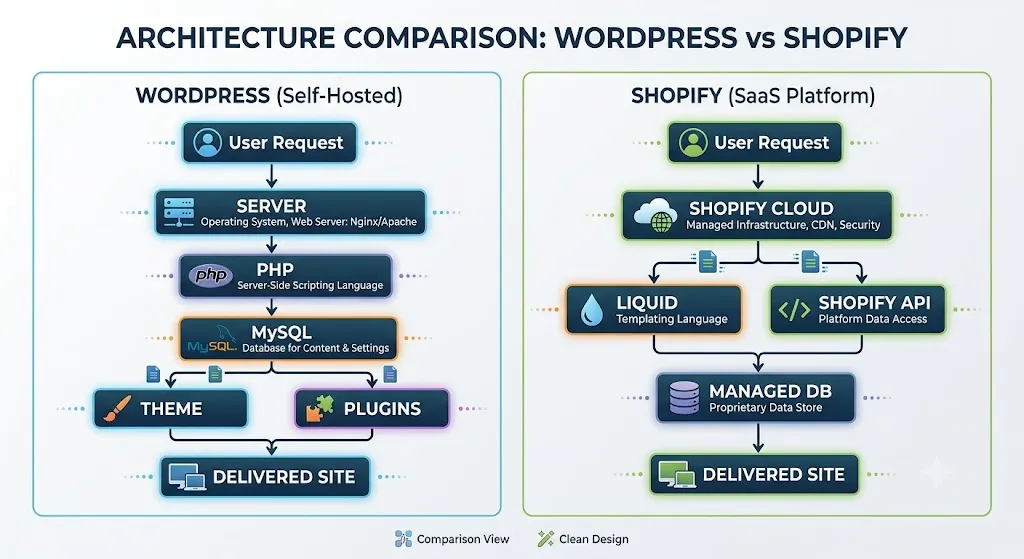
WordPress is open-source PHP running against a MySQL (or MariaDB) database, self-hosted on whatever
server you choose. Its extensibility comes from a hooks-and-filters system — actions and filters that let
themes and plugins modify behavior without touching core files.
Themes follow a template hierarchy (single.php, archive.php, page.php and so on), and since the
Gutenberg editor shipped, pages are built from JSON-serialized blocks stored directly in post content. For
stores, WooCommerce bolts commerce tables (orders, products, customers) onto the same WordPress database.
Because you own the full stack, you can go headless with the WP REST API or WPGraphQL and pair it with a
React or Next.js frontend.
Shopify is a proprietary, fully hosted platform (Ruby and Go on the backend, not publicly documented in detail). You do not manage servers, PHP versions, or database tuning — Shopify does.
Storefronts are built with Liquid, Shopify’s templating language, using the OS 2.0 sections-and-blocks JSON model, which is conceptually similar to Gutenberg blocks but scoped entirely to commerce. Deeper customization happens through the Admin API and Storefront API (both GraphQL-first now), Shopify Functions (server-side customization written in Rust/WebAssembly, replacing the older Shopify Scripts), and app embedding via App Bridge. Headless Shopify is a first-party path through Hydrogen (React framework) deployed on Oxygen.
Takeaway:
- WordPress gives you the keys to the whole car. Shopify gives you a very well-engineered car you’re not allowed to open the hood on and mostly, you won’t need to.
2. Cost
Shopify starts around $39/month on the Basic plan, $105/month on Shopify, and scales to Shopify Plus (roughly $2,000+/month) for high-volume merchants. Add transaction fees (0.5%–2% if you’re not using Shopify Payments), plus paid apps for reviews, upsells, and email many real stores end up at $150–$300/month once a handful of apps are installed.
WordPress itself is free (GPL-licensed). You pay for hosting shared hosting from $5–$15/month, managed WordPress hosting (Kinsta, WP Engine) from $30–$100/month depending on traffic plus a domain, and optionally premium themes/plugins. WooCommerce is free; extensions (subscriptions, advanced shipping, memberships) are usually $79–$199/year each, one-time or annual, not recurring monthly SaaS fees.
Verdict:
- WordPress is cheaper at scale if you or your team can manage it. Shopify’s higher monthly cost buys you infrastructure, support, and uptime you never have to think about.
3. Ease of use and admin experience
Shopify was built for store owners with zero technical background. Adding products, configuring shipping zones, and processing orders takes minutes. The admin panel is opinionated everything commerce-related is exactly where you’d expect it.
WordPress has a steeper curve, especially once WooCommerce is layered on. Updates, plugin conflicts, and security patches are the site owner’s responsibility unless someone is managing it. The tradeoff for that complexity is that almost nothing is off-limits.
Verdict:
- Shopify wins for non-technical teams that want to sell online without managing infrastructure.
4. Design and customization
This is where WordPress pulls ahead for anything beyond a storefront. With the full theme and plugin ecosystem and custom code when needed a WordPress site can be built to do almost anything: booking systems, membership portals, multi-language content hubs, directories, LMS platforms.
Shopify’s customization is strong specifically for storefronts, using Liquid, sections, and the app store. Pushing it outside the commerce use case (a full content hub, a job board, a booking engine) means fighting the platform rather than working with it.
Verdict:
- WordPress for flexibility, Shopify for a focused, polished store experience.
5. Performance and Core Web Vitals
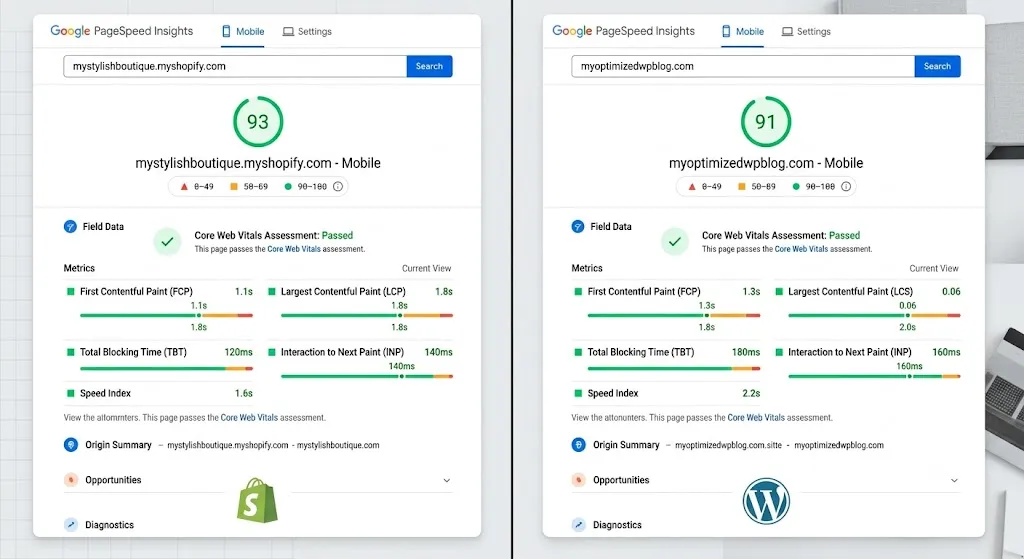
Shopify serves every store through its global CDN (Fastly-backed) by default. Image optimization, edge caching, and server response times are handled at the platform level. A brand-new Shopify store typically starts with a strong Largest Contentful Paint (LCP) and Time to First Byte, with no configuration required.
WordPress performance depends entirely on hosting and configuration. A well-tuned WordPress site on managed hosting with a caching plugin (WP Rocket, W3 Total Cache) and a CDN (Cloudflare) can match or beat Shopify’s speed. An unoptimized WordPress site on cheap shared hosting, loaded with 20 plugins, will fail Core Web Vitals badly. The ceiling is higher on WordPress; the floor is much lower too.
Verdict:
- Shopify for guaranteed baseline performance. WordPress for a higher ceiling if you invest in proper hosting and optimization.
6. SEO
Both platforms can rank well; SEO success comes down to execution far more than the platform badge. Structurally, though:
WordPress gives direct control over URL structure, permalinks, schema markup, canonical tags, and page speed through plugins (Yoast, Rank Math) or custom code.
Shopify has improved significantly on SEO defaults in recent updates (automatic sitemap.xml, editable meta tags, structured data on products by default), but URL structures for collections and blogs are more rigid —
/collections/,/products/,/blogs/prefixes can’t be removed without a workaround, and some technical changes require app or Liquid-level intervention.
We’ve taken Shopify stores from page two to page one of Google using the strategies covered in our Shopify SEO guide, so this isn’t a dealbreaker on Shopify just something to plan for.
Verdict:
- Tie, with a slight edge to WordPress for teams that want full technical control over URL structure and schema.
7. Scalability and enterprise options
Shopify scales through Shopify Plus dedicated infrastructure, higher API rate limits, checkout customization via Shopify Functions, and support for flash-sale-level traffic without the merchant managing servers.
WordPress scales through managed enterprise hosting (WP VIP, Kinsta Enterprise) with load balancing, database replication, and dedicated resources. It requires more deliberate architecture decisions as traffic grows — Shopify’s scaling is closer to “automatic,” WordPress’s is closer to “engineered.”
Verdict:
- Shopify for near-zero-effort scaling. WordPress for teams with the technical resources to architect for scale on their own terms.
8. Security
Shopify is PCI DSS Level 1 compliant out of the box, patches vulnerabilities platform-wide, and merchants never touch server security directly.
WordPress requires ongoing maintenance: core updates, plugin updates, backups, and monitoring. Most real-world WordPress breaches come from outdated plugins, not WordPress core itself, so a maintenance plan (or a security plugin like Wordfence) isn’t optional, it’s part of the cost of ownership.
Verdict:
- Shopify for hands-off compliance. WordPress if a maintenance plan is already in place.
9. Ecosystem: apps and plugins
Shopify’s App Store is curated and quality-controlled, but most useful apps carry a monthly fee, and fees stack quickly.
WordPress’s plugin repository has 60,000+ free, GPL-licensed plugins, plus a large premium market. Quality varies more since there’s no central review process, but the ceiling on “something already exists for this” is much higher.
Verdict:
- WordPress for breadth and lower cost. Shopify for curated, commerce-specific reliability.
10. Ownership and portability
WordPress data lives in a database you fully own export it, move hosts, migrate to another CMS, all without platform permission.
Shopify data is exportable (products, customers, orders as CSV), but the store itself theme, app configurations, checkout customizations does not move off Shopify’s infrastructure.
Leaving Shopify means rebuilding the storefront elsewhere.
Verdict:
- WordPress for long-term ownership. Shopify trades some portability for its managed convenience.
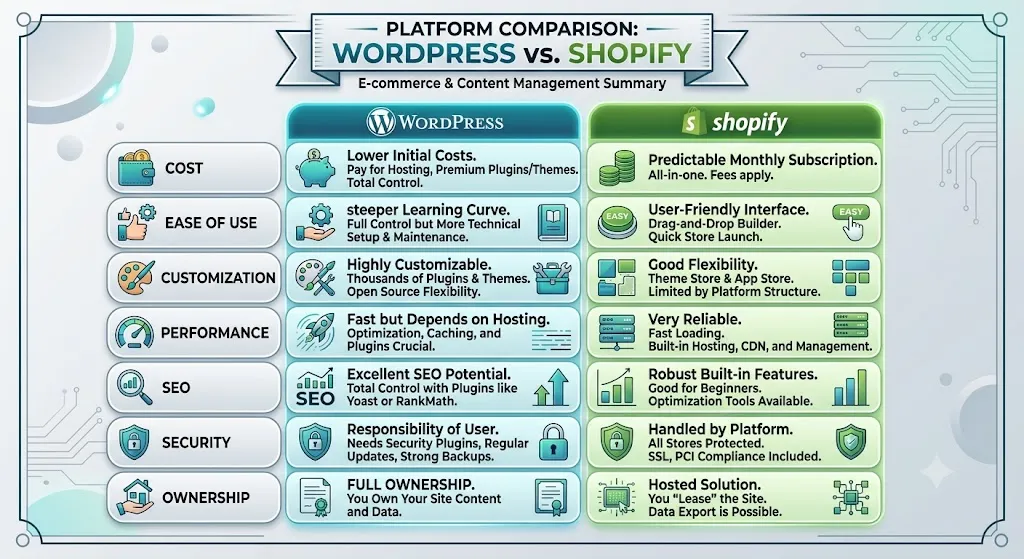
So which one should you pick?
Choose Shopify if:
- You’re selling physical products and want to launch quickly
- You don’t have in-house technical staff
- You want predictable performance, security, and support without managing infrastructure
Choose WordPress if:
- Your business is service-based, content-based, or needs custom functionality
- You want lower long-term costs and full ownership of your site and data
- You have a developer or agency handling updates, hosting, and maintenance
Neither platform is “better” in the abstract. The right choice depends on what the site needs to do, who’s running it day to day, and where you want to be in three years.
Still not sure?
We build and maintain both WordPress and Shopify sites for businesses across Pakistan and beyond. If you’re stuck between the two, book a free audit call and we’ll walk through your specific situation - no obligation, no generic pitch.
Was this article helpful?