Shopify
How To Show Sale Discount Percentage on Shopify
Creatify
·
Learn how to display sale discount percentage on Shopify product pages using Liquid code. This guide helps you show dynamic discount badges (e.g. -20%) to improve user trust, boost conversions, and make your Shopify store look more professional and sales-focused.

Step 1: Replace the code in _product-card-gallery.liquid
Replace the following code in _product-card-gallery.liquid
{%- if product.available == false or product.compare_at_price > product.price and product.available -%}
    <div
    class="
        product-badges__badge product-badges__badge--rectangle
        {% if product.available == false %} color-{{ settings.badge_sold_out_color_scheme }}{% elsif product.compare_at_price > product.price %} color-{{ settings.badge_sale_color_scheme }}{% endif %}
    "
    >
    {%- if product.available == false -%}
        {{ 'content.product_badge_sold_out' | t }}
    {%- elsif product.compare_at_price > product.price -%}
        {{ 'content.product_badge_sale' | t }}
    {%- endif -%}
    </div>
{%- endif -%}
With the following code
{%- assign current_variant = product.selected_or_first_available_variant -%}
{%- assign compare_at_price = product.compare_at_price_max -%}
{%- assign price = product.price -%}

{%- if product.available == false or compare_at_price > price -%}
    <div class="product-badges__badge product-badges__badge--rectangle
        {% if product.available == false %}
        color-{{ settings.badge_sold_out_color_scheme }}
        {% else %}
        color-{{ settings.badge_sale_color_scheme }}
        {% endif %}"
    >
    {%- if product.available == false -%}
        {{ 'content.product_badge_sold_out' | t }}
    {%- else -%}
        {%- assign max_discount = 0 -%}
        {%- for variant in product.variants -%}
        {%- if variant.compare_at_price > variant.price -%}
            {%- assign diff = variant.compare_at_price | minus: variant.price | times: 100 | divided_by: variant.compare_at_price -%}
            {%- if diff > max_discount -%}
            {%- assign max_discount = diff | round -%}
            {%- endif -%}
        {%- endif -%}
        {%- endfor -%}
        {%- if max_discount > 0 -%}{{ max_discount }}% OFF{%- endif -%}
    {%- endif -%}
    </div>
{%- endif -%}
Step 2: Create new block
Open code editor, create a new code block file. Copy the following code:
👉 Click to View Code
{%- liquid
  assign unique_id = block.id
-%}

{% style %}
  .wsp-price-block-{{ unique_id }} {
    display: flex;
    flex-direction: column;
    gap: {{ block.settings.spacing }}px; /* This gap is between price-wrapper and (removed) unit-price */
    align-items: {{ block.settings.alignment }}; /* This aligns the .wsp-price-wrapper horizontally */
  }

  .wsp-price-wrapper-{{ unique_id }} {
    display: flex;
    flex-wrap: wrap;
    gap: {{ block.settings.price_spacing }}px;
    align-items: center;
  }

  .wsp-current-price-{{ unique_id }} {
    font-size: {{ block.settings.price_size }}px;
    font-weight: {{ block.settings.price_weight }};
    color: {{ block.settings.price_color }};
    line-height: 1;
  }

  .wsp-compare-price-{{ unique_id }} {
    font-size: {{ block.settings.compare_price_size }}px;
    color: {{ block.settings.compare_price_color }};
    text-decoration: line-through;
    line-height: 1;
  }

  .wsp-discount-badge-{{ unique_id }} {
    background-color: {{ block.settings.discount_badge_bg }};
    color: {{ block.settings.discount_badge_color }};
    padding: {{ block.settings.badge_padding_vertical }}px {{ block.settings.badge_padding_horizontal }}px;
    border-radius: {{ block.settings.badge_border_radius }}px;
    font-size: {{ block.settings.discount_size }}px;
    font-weight: {{ block.settings.discount_weight }};
    display: inline-flex;
    align-items: center;
    justify-content: center;
    line-height: 1;
  }


  @keyframes wsp_bounce {
    0%, 20%, 50%, 80%, 100% {transform: translateY(0);}
    40% {transform: translateY(-10px);}
    60% {transform: translateY(-5px);}
  }

  @keyframes wsp_flash {
    0%, 50%, 100% {opacity: 1;}
    25%, 75% {opacity: 0.3;}
  }

  @keyframes wsp_pulse {
    0% {transform: scale(1); }
    50% {transform: scale(1.1); }
    100% {transform: scale(1); }
  }

  @keyframes wsp_fadeIn {
    from { opacity: 0; }
    to { opacity: 1; }
  }

  @keyframes wsp_slideInUp {
    from { transform: translateY(15px); opacity: 0; }
    to { transform: translateY(0); opacity: 1; }
  }

  .wsp-discount-animated-text-{{ unique_id }} {
    display: inline-block;
    {% if block.settings.animation_type != 'none' and block.settings.animation_type != blank %}
      animation-name: {{ block.settings.animation_type }};
      animation-duration: {{ block.settings.animation_duration }}s;
      animation-timing-function: {{ block.settings.animation_timing_function }};
      animation-iteration-count: {{ block.settings.animation_iteration_count }};
      animation-delay: {{ block.settings.animation_delay }}s;
      animation-fill-mode: forwards;
    {% endif %}
  }

  @media screen and (max-width: 749px) {
    .wsp-current-price-{{ unique_id }} {
      font-size: {{ block.settings.price_size | times: 0.85 }}px;
    }

    .wsp-compare-price-{{ unique_id }} {
      font-size: {{ block.settings.compare_price_size | times: 0.85 }}px;
    }

    .wsp-discount-badge-{{ unique_id }} {
      font-size: {{ block.settings.discount_size | times: 0.85 }}px;
      padding: {{ block.settings.badge_padding_vertical | times: 0.85 }}px {{ block.settings.badge_padding_horizontal | times: 0.85 }}px;
    }
  }
{% endstyle %}

<div class="wsp-price-block-{{ unique_id }} price" {{ block.shopify_attributes }}>
  <div class="wsp-price-wrapper-{{ unique_id }}">
    {%- assign selected_variant = product.selected_or_first_available_variant -%}


    <span class="wsp-current-price-{{ unique_id }} price-item price-item--regular" data-regular-price>
      {{ selected_variant.price | money }}
    </span>

    {% if selected_variant.compare_at_price > selected_variant.price %}

      <span class="wsp-compare-price-{{ unique_id }} price-item price-item--sale" data-compare-price>
        {{ selected_variant.compare_at_price | money }}
      </span>

      {% if block.settings.show_discount_badge %}
          {% assign compare_price = selected_variant.compare_at_price %}
          {% assign current_price = selected_variant.price %}
          {% assign discount_value = compare_price | minus: current_price %}
          {% assign discount_percentage = discount_value | times: 100.0 | divided_by: compare_price | round %}

          <span class="wsp-discount-badge-{{ unique_id }}">
            <span class="wsp-discount-animated-text-{{ unique_id }}">
              {% if block.settings.discount_badge_text != blank %}
                {{ block.settings.discount_badge_text | replace: '[discount]', discount_percentage }}
              {% else %}
                {{ discount_percentage }}% off
              {% endif %}
            </span>
          </span>
      {% endif %}
    {% endif %}
  </div>
</div>

{% schema %}
{
  "name": "Product Price (WSP)",
  "tag": "section",
  "class": "shopify-section--product-price-wsp",
  "settings": [
    {
      "type": "header",
      "content": "Layout"
    },
    {
      "type": "select",
      "id": "alignment",
      "label": "Block Content Alignment",
      "info": "Aligns the price group (current, compare, badge) horizontally within this block. Effect depends on block's width in the theme.",
      "options": [
        { "value": "flex-start", "label": "Left" },
        { "value": "center", "label": "Center" },
        { "value": "flex-end", "label": "Right" }
      ],
      "default": "flex-start"
    },
    {
      "type": "range",
      "id": "spacing",
      "min": 0,
      "max": 20,
      "step": 1,
      "unit": "px",
      "label": "Vertical spacing (if multiple groups existed)",
      "default": 0,
      "info": "Previously used for space below price group. Less relevant now."
    },
    {
      "type": "range",
      "id": "price_spacing",
      "min": 4,
      "max": 20,
      "step": 1,
      "unit": "px",
      "label": "Horizontal spacing (between price elements)",
      "default": 8
    },
    {
      "type": "header",
      "content": "Current price"
    },
    {
      "type": "range",
      "id": "price_size",
      "min": 12,
      "max": 60,
      "step": 1,
      "unit": "px",
      "label": "Font size",
      "default": 24
    },
    {
      "type": "select",
      "id": "price_weight",
      "label": "Font weight",
      "options": [
        { "value": "400", "label": "Regular" },
        { "value": "500", "label": "Medium" },
        { "value": "600", "label": "Semibold" },
        { "value": "700", "label": "Bold" }
      ],
      "default": "600"
    },
    {
      "type": "color",
      "id": "price_color",
      "label": "Color",
      "default": "#000000"
    },
    {
      "type": "header",
      "content": "Compare-at price"
    },
    {
      "type": "range",
      "id": "compare_price_size",
      "min": 12,
      "max": 40,
      "step": 1,
      "unit": "px",
      "label": "Font size",
      "default": 16
    },
    {
      "type": "color",
      "id": "compare_price_color",
      "label": "Color",
      "default": "#767676"
    },
    {
      "type": "header",
      "content": "Discount badge"
    },
    {
      "type": "checkbox",
      "id": "show_discount_badge",
      "label": "Show discount percentage",
      "default": true
    },
    {
      "type": "text",
      "id": "discount_badge_text",
      "label": "Custom text (use [discount] for percentage)",
      "info": "Example: Save [discount]% or [discount]% OFF!",
      "default": "Save [discount]%"
    },
    {
      "type": "range",
      "id": "discount_size",
      "min": 10,
      "max": 24,
      "step": 1,
      "unit": "px",
      "label": "Font size",
      "default": 14
    },
    {
      "type": "select",
      "id": "discount_weight",
      "label": "Font weight",
      "options": [
        { "value": "400", "label": "Regular" },
        { "value": "500", "label": "Medium" },
        { "value": "600", "label": "Semibold" },
        { "value": "700", "label": "Bold" }
      ],
      "default": "700"
    },
    {
      "type": "color",
      "id": "discount_badge_color",
      "label": "Text color",
      "default": "#FFFFFF"
    },
    {
      "type": "color",
      "id": "discount_badge_bg",
      "label": "Background color",
      "default": "#E31B1B"
    },
    {
      "type": "range",
      "id": "badge_padding_vertical",
      "min": 2,
      "max": 12,
      "step": 1,
      "unit": "px",
      "label": "Vertical padding",
      "default": 4
    },
    {
      "type": "range",
      "id": "badge_padding_horizontal",
      "min": 4,
      "max": 20,
      "step": 1,
      "unit": "px",
      "label": "Horizontal padding",
      "default": 8
    },
    {
      "type": "range",
      "id": "badge_border_radius",
      "min": 0,
      "max": 20,
      "step": 1,
      "unit": "px",
      "label": "Border radius",
      "default": 4
    },
    {
      "type": "header",
      "content": "Discount Animation"
    },
    {
      "type": "select",
      "id": "animation_type",
      "label": "Animation Type",
      "options": [
        { "value": "none", "label": "None" },
        { "value": "wsp_bounce", "label": "Bounce" },
        { "value": "wsp_flash", "label": "Flash" },
        { "value": "wsp_pulse", "label": "Pulse" },
        { "value": "wsp_fadeIn", "label": "Fade In" },
        { "value": "wsp_slideInUp", "label": "Slide In Up" }
      ],
      "default": "none",
      "info": "Select an animation for the discount text."
    },
    {
      "type": "range",
      "id": "animation_duration",
      "label": "Animation Duration",
      "min": 0.1,
      "max": 5,
      "step": 0.1,
      "unit": "s",
      "default": 1,
      "info": "How long the animation takes to complete one cycle."
    },
    {
      "type": "select",
      "id": "animation_timing_function",
      "label": "Animation Speed Curve",
      "options": [
        { "value": "ease", "label": "Ease (default)" },
        { "value": "linear", "label": "Linear" },
        { "value": "ease-in", "label": "Ease In" },
        { "value": "ease-out", "label": "Ease Out" },
        { "value": "ease-in-out", "label": "Ease In Out" }
      ],
      "default": "ease",
      "info": "Controls the acceleration curve of the animation."
    },
    {
      "type": "select",
      "id": "animation_iteration_count",
      "label": "Animation Repetitions",
      "options": [
        { "value": "1", "label": "Once" },
        { "value": "2", "label": "Twice" },
        { "value": "3", "label": "Three Times" },
        { "value": "infinite", "label": "Infinite (loops forever)" }
      ],
      "default": "1",
      "info": "How many times the animation should play."
    },
    {
      "type": "range",
      "id": "animation_delay",
      "label": "Animation Delay",
      "min": 0,
      "max": 10,
      "step": 0.1,
      "unit": "s",
      "default": 0,
      "info": "Wait time before the animation starts."
    }

  ],
  "presets": [
    {
      "name": "Product Price (WSP)"
    }
  ]
}


{% endschema %}

<script>
(function() {
  const productJson = {{ product | json }};
  const uniqueId = "{{ unique_id }}";
  const currencySymbol = "{{ cart.currency.symbol }}";


  function formatMoney(cents) {
    if (typeof cents !== 'number') cents = parseInt(cents);
    return currencySymbol + (cents / 100).toFixed(2);
  }
  function updateLivePrice() {
    const currentPriceElem = document.querySelector(`.wsp-current-price-${uniqueId}`);
    const comparePriceElem = document.querySelector(`.wsp-compare-price-${uniqueId}`);
    const badgeElem = document.querySelector(`.wsp-discount-badge-${uniqueId}`);
    const badgeTextElem = document.querySelector(`.wsp-discount-animated-text-${uniqueId}`);

    if (!currentPriceElem) return;


    const params = new URLSearchParams(window.location.search);
    let variantId = params.get('variant');


    let selectedVariant = variantId
      ? productJson.variants.find(v => v.id == variantId)
      : productJson.variants[0];

    if (!selectedVariant) selectedVariant = productJson.variants[0];


    currentPriceElem.innerHTML = formatMoney(selectedVariant.price);

    if (selectedVariant.compare_at_price > selectedVariant.price) {
      if (comparePriceElem) {
        comparePriceElem.style.display = 'inline-block';
        comparePriceElem.innerHTML = formatMoney(selectedVariant.compare_at_price);
      }

      if (badgeElem) {
        badgeElem.style.display = 'inline-flex';
        let discount = Math.round(((selectedVariant.compare_at_price - selectedVariant.price) * 100) / selectedVariant.compare_at_price);

        let configText = "{{ block.settings.discount_badge_text }}";
        badgeTextElem.innerHTML = configText.includes('[discount]')
          ? configText.replace('[discount]', discount)
          : discount + "% off";
      }
    } else {

      if (comparePriceElem) comparePriceElem.style.display = 'none';
      if (badgeElem) badgeElem.style.display = 'none';
    }
  }


  let lastUrl = location.href;
  new MutationObserver(() => {
    if (location.href !== lastUrl) {
      lastUrl = location.href;
      updateLivePrice();
    }
  }).observe(document, {subtree: true, childList: true});


  document.addEventListener('change', (e) => {
    if (e.target.name === 'id' || e.target.closest('.variant-input')) {
      setTimeout(updateLivePrice, 50);
    }
  });


  updateLivePrice();

})();
</script>
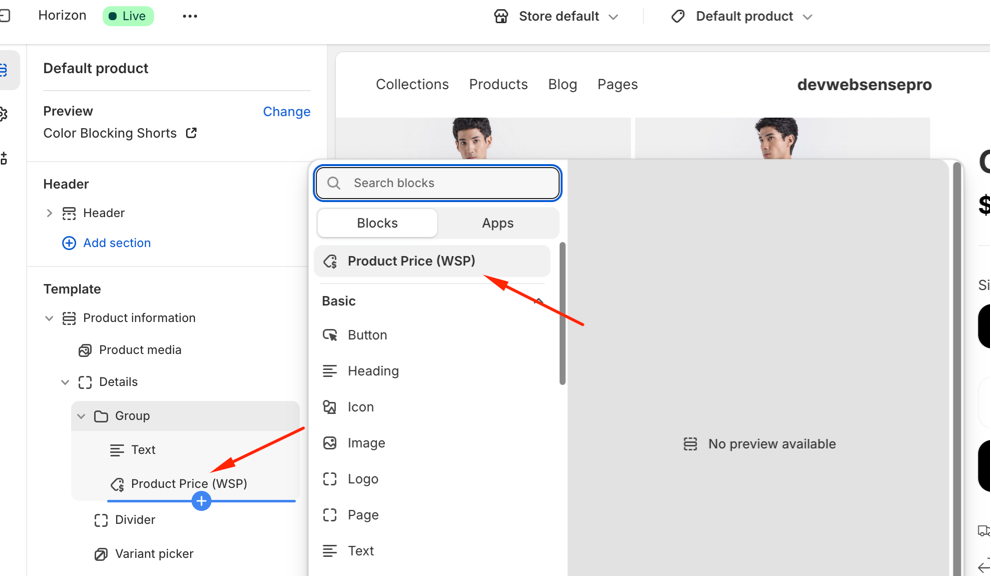
Step 3: Add block in Product Page Template
- Goto Customize theme » Product Page Template and Add New Block as per the screenshot below:
Was this article helpful?